Create virtual printers using virtual printer ports.
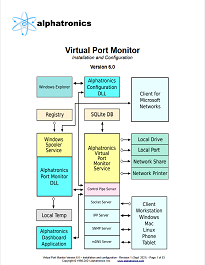
Virtual Port Monitor acts as a multi-port print stream capture service. It can receive data using the most popular methods, and place the captured stream into the output folder you select.
Initially developed exclusively as a Windows printer port monitor, it has evolved to also include TCP/IP Socket, IPP, and AirPrint as endpoint options, as well as leveraging MDNS, DNS-SD, and SNMP for network discovery and configuration, enabling BYOD / driverless printing from Windows, Mac, iOS, Android, and Linux platforms.
Once the file has been written the the output folder, an executable, script, or batch program can be run with the name of the file automatically added to the end of the command line or at the position of %1. Other generated environment variables are also available for insertion into the command line.
The new Debug Reporting feature can be enabled to provide screen shots, Standard Output / Error messages, as well as security and environment information. Debug Reporting can be enabled per-port as either always enabled, disabled, or triggered upon error detection.
- Captures printer output from nearly any type of printer driver
- Automatic assignment of filenames with multiple naming options
- Selectable assignment of extension
- Run executable file upon completion
- Supports security for the application and the writing of files and printers
- Runs within a given security context and user profile for each port
- Supports Terminal Services
- Supports Cluster Servers
- Supports creation of DOS LPT1-9 ports
- Application wait timer for serialization of execution
- Optionally delete original output file upon successful termination of application
- Printers that use virtual ports can be shared on the network
- Multi-Port data forwarding (local or network)
- Print to log file with automatic date or specified file name
- Optionally store files in the user, computer, printer, or driver subdirectory
- Drag and Drop Printing to printers folder
- Environment variables for post-print application and command line substitution
- Works with Ghostscript, ImageMagick, and several other 3rd party solutions
- TCP/IP Printing capability
- IPP Printing capability
- SNMP Configuration capability
- MDNS Discovery and Configuration capability
- Debug Reporting
- Raster Utility
- Line Printer Utility
- Launcher
- Faster than manual print to file
- Eliminates human error for folder and filename selection
- Windows XP, 7 ,8, 10, 2003, 2008, 2012, 2016, 2019
- 32 and 64 bit
- Workstation and Server
Dashboard
View and control the status of Virtual Port Monitor using a single application.
TCP/IP Printing
Capture printer output from network clients or loopback using a Standard TCP/IP Printer Port.
This allows the capture of Version 4 printer driver data as well.
IPP (Internet Printing Protocol)
Capture printer output from clients using Internet Printing Protocol, which is used by most portable devices.
SNMP (Simple Network Management Protocol)
Enables network clients to associate a printer port with a printer driver when using the Add Printer Wizard. Macintosh devices utilize SNMP for printer status when using TCP/IP Printer ports.
MDNS (Multicast Domain Name System)
Enables certain network clients to discover the network printing services of Virtual Port Monitor.
Apple AirPrint
Advertises IPP Printers to iOS clients, such as iPhones and iPads.
Raster Utility
Converts AirPrint URF and PWG raster streams to print, document, or image formats.
Line Printer Utility
Converts 9-pin dot matrix streams to print, document, or image formats.
Launcher
Simplifies the command line by using preconfigured applications for post-processing.
Debug Reporting
Per-port debug reporting can be enabled, disabled, or set to emit a report on detected error.
When enabled, it provides a detailed report of the execution environment, taking the guesswork out of troubleshooting.
Resizable dialogs
Resizing the Port Dialog and the Dashboard resizes the objects on the screen.
Dialog state
Dialogs now remember their size, position, and menu page.
Configuration information is now stored in a standard SQLite database
Eliminates issues with backup, restore, deployment, and replication.
Simply make a copy of the files located in the "%ProgramData%\Alphatronics\Virtual Port Monitor" folder.
UTC or local time for timestamped filenames.
Use the option you prefer.
JSON RPC
Internally, the Dashboard application and Port Dialog use JSON/Ajax for communications with the Alphatronics Virtual Port Monitor service.
Previous versions used SOAP.
Windows RPC thread isolation
Virtual Port Monitor no longer changes the impersonation token of the Windows RPC threads used during port configuration.
A separate isolation thread is used on both ends of the conversation.